Which pencils does it use?
Faber-Castell Polychromos by default, with Prismacolor Premier one tap away in Settings. Markers (including Copic) are not supported in this version. A plan uses at most 7 pencils, in order from light to dark.
Pencil Planner for Any Page
See your page in color before you start.
For iPhone. Polychromos codes for every step.

Neon pop
See your page in color before you start. The lines are the original drawing.
A plan with real pencil codes, light to dark.


The pencils
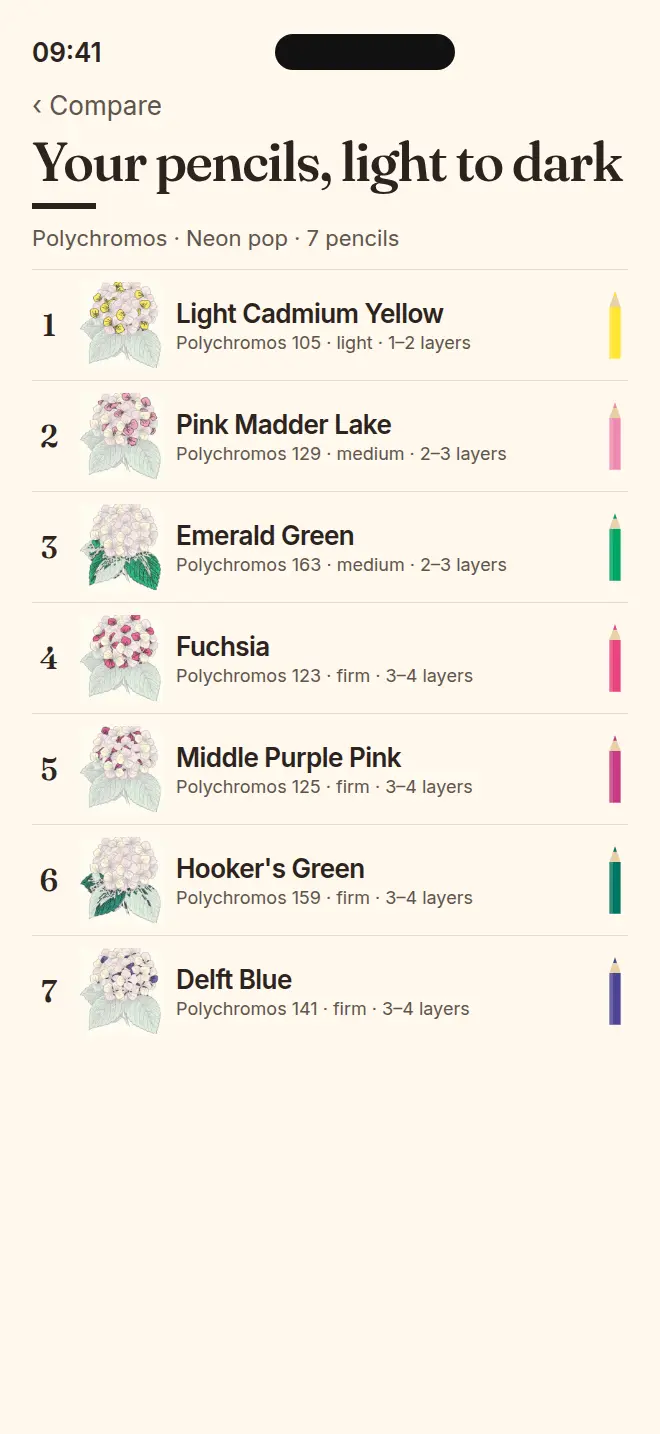
A plan with real pencil codes, light to dark. Neon pop on the hydrangea sample.
Colour the plan
Each step shows which pencil goes where, so you can recreate the look on paper.
 1Light Cadmium YellowPolychromos 105 · Light · 1–2 layers
 2Pink Madder LakePolychromos 129 · Medium · 2–3 layers
 3Emerald GreenPolychromos 163 · Medium · 2–3 layers
 4FuchsiaPolychromos 123 · Firm · 3–4 layers
 5Middle Purple PinkPolychromos 125 · Firm · 3–4 layers
 6Hooker's GreenPolychromos 159 · Firm · 3–4 layers
 7Delft BluePolychromos 141 · Firm · 3–4 layers
Tap Scan a page and photograph any coloring page. Or start with a sample page.
Four finished looks for your page. Choose the one you want on paper.
One pencil at a time, in order, with its Polychromos number. Start coloring.
Launching on iPhone. This button becomes the download link on launch day.
Pick a look
Same page, same lines. Each look comes with its own six pencils.




The app
Try the Color: Coloring Book. Snap a coloring page, pick a look, see four finished versions, and get a pencil plan: which pencil, which area, in what order, light to dark. You do the coloring.
Your coloring-page photos are processed on your iPhone. They are never uploaded, we never see them, and they are never used to train AI or anything else.
No sign-up, no ads, no analytics, no crash-reporting SDK, and no tracking. The only SDK is RevenueCat. It sees a random anonymous ID and your purchase history, never your pages.
Faber-Castell Polychromos by default, with Prismacolor Premier one tap away in Settings. Markers, including Copic, are not supported. Colors are a close match to each brand’s published chart. Try the Color is independent and is not affiliated with these brands.
A plan uses at most 7 pencils, in order from light to dark. Your lines are never redrawn.
Each page gets four colored versions. Screenprint, Riso, CMYK, and Neon pop are bolder looks made with the same real pencils.
The page you keep is saved only on this iPhone, under My pages, until you delete it. It is excluded from iCloud and device backups.
Plans
After that, one plan unlocks the full plan for one page for good, including when you come back to it later.
To start
Free
Your first full plan is free.
Keep going
Packs never expire.
Yearly
$24.99/ year
10 plans a month, rolling over up to 60 while you are subscribed.
Prices are shown in US dollars and may differ in your App Store region.
Try the Color Plus is a yearly subscription. It renews automatically unless you cancel at least 24 hours before the end of the period. Manage or cancel it in the app (Settings → Manage subscription) or in iPhone Settings → your name → Subscriptions. Purchases go through Apple.
Questions
Email support+trythecolor@sideeyelabs.io. We usually reply within 2 business days (Singapore time).
Faber-Castell Polychromos by default, with Prismacolor Premier one tap away in Settings. Markers (including Copic) are not supported in this version. A plan uses at most 7 pencils, in order from light to dark.
Screenprint, Riso, CMYK and Neon pop are bolder looks made with the same real pencils.
In My pages, on this iPhone only. There is no account and no cloud sync, so pages do not move to a new phone and are not in backups. Delete a page from its menu, or everything from Settings.
No. This version plans your page with on-device image processing and real pencil colors. Nothing is sent to an AI service, and your pages are never used to train anything.
Privacy
Photos are processed on your device and are never used for training. There is no account, no ads, no analytics, and no tracking. RevenueCat is the only SDK, and it never sees your pages. So a feature can be paused if something goes wrong, the app also downloads one small settings file from sideeyeapps.com. That request carries no ID, no photos, and no information about your pages.

Try the Color · Pencil Planner for Any Page · iPhone